

Download Ironscales – Comprehensive Email Security, AI‑Powered Phishing Protection
Overview of Ironscales
Ironscales is a web‑based email security platform that combines Adaptive AI with a user‑centric workflow to shield organizations from the most sophisticated email‑borne attacks. From classic phishing and Business Email Compromise (BEC) to newer threats such as QR‑code phishing and targeted spam campaigns, Ironscales continuously scans inbound and outbound messages, delivering real‑time protection without slowing down the inbox. The solution’s standout attribute is its three‑click integration for Microsoft 365 and Google Workspace, which means IT teams can roll out the service across thousands of users in minutes rather than days.
Once deployed, the Adaptive AI engine learns the normal communication patterns of each user, building a behavioral baseline that enables it to spot anomalies instantly. When a suspicious message is detected, the platform not only alerts the recipient but also triggers automated remediation—quarantining the email, removing malicious links, and notifying the security operations center. This blend of proactive detection, automated response, and granular control makes Ironscales a compelling choice for enterprises seeking a balance between security rigor and operational simplicity.
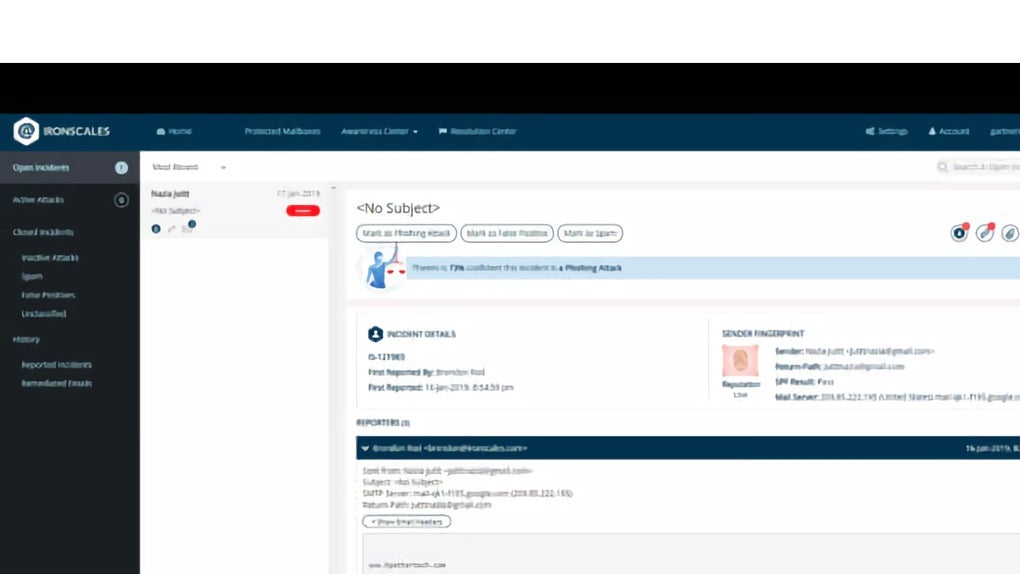
The platform’s dashboard offers clear visualizations of threat trends, false‑positive rates, and remediation statistics, giving security leaders the data they need to fine‑tune policies and demonstrate ROI to executives. In short, Ironscales delivers a secure, scalable, and user‑friendly email defense that adapts as attackers evolve.
Key Features that Set Ironscales Apart
- Adaptive AI Engine: Combines behavioral detection, contextual reasoning, and agentic automation to identify threats that traditional signature‑based tools miss.
- Three‑Click Deployment: Seamless integration with Microsoft 365 and Google Workspace reduces onboarding time and eliminates complex configuration.
- Real‑Time Threat Analysis: Every email is scanned at the moment of delivery using specialized machine‑learning models for phishing, BEC, QR‑code attacks, and spam.
- Automated Remediation: The system can automatically quarantine malicious messages, strip dangerous links, and roll back compromised accounts.
- Smart Email Clustering: Similar threats are grouped together, allowing security teams to investigate patterns rather than isolated incidents.
- User Reporting & Training: End‑users can report suspicious emails with a single click, feeding the AI with fresh data while reinforcing security awareness.
- Customizable Automation Levels: Organizations can choose between fully automated response, human‑in‑the‑loop review, or a hybrid approach.
- Comprehensive Dashboard & Reporting: Visual insights into threat volume, remediation speed, and false‑positive metrics help drive continuous improvement.
- API & SIEM Integration: Export alerts to existing security information and event management (SIEM) platforms for unified incident response.
- Regulatory Compliance Support: Built‑in controls aid compliance with GDPR, HIPAA, and other data‑protection regulations.
Installation, Usage, and Compatibility
Step‑by‑Step Deployment
Getting Ironscales up and running is intentionally straightforward. After signing up for a trial or purchasing a license, the admin receives a secure invitation link. Clicking the link opens the Ironscales portal, where the admin selects the desired email provider—Microsoft 365 or Google Workspace. With three clicks, the platform requests the necessary OAuth permissions, automatically creates a service account, and begins mirroring mail flow. No on‑premises appliances or additional agents are required, which reduces maintenance overhead and eliminates compatibility headaches.
Day‑to‑Day Usage
Once active, the platform works silently in the background. End‑users see a subtle banner on suspicious emails, offering a “Report Phish” button. If a threat is confirmed, Ironscales logs the incident, updates its AI model, and notifies the security team via email or integrated ticketing system. Administrators access a web‑based console where they can review incidents, adjust automation policies, and generate compliance reports. The console also provides a “Threat Heatmap” that visualizes attack origins, helping teams prioritize remediation.
Supported Operating Systems
Because Ironscales is a cloud‑native SaaS solution, it is OS‑agnostic for end users. The web console runs on any modern browser across Windows, macOS, Linux, iOS, and Android devices. The back‑end integrates directly with Microsoft 365 (Windows, macOS, and mobile) and Google Workspace (all platforms). This universal compatibility ensures that remote workers, BYOD environments, and hybrid offices receive identical protection without extra client installations.
Pros, Cons, Frequently Asked Questions, and Final Thoughts
Pros & Cons
- Pros:
- Fast, three‑click deployment eliminates lengthy rollout cycles.
- Adaptive AI continuously learns, reducing false positives over time.
- Automated remediation speeds up incident response and lowers manual workload.
- Intuitive user‑reporting encourages a security‑aware culture.
- Broad compatibility across major email platforms and devices.
- Rich reporting supports compliance and executive reporting.
- Cons:
- Pricing is subscription‑based, which may be a consideration for very small businesses.
- Full automation may require fine‑tuning to match an organization’s risk tolerance.
- While the web console is powerful, it can feel feature‑rich for newcomers, requiring a brief learning curve.
Frequently Asked Questions
How does Ironscales differ from traditional email filters?
Traditional filters rely heavily on static signatures and blacklist rules, which struggle against zero‑day phishing and BEC attacks. Ironscales uses Adaptive AI that evaluates user behavior, message context, and real‑time threat intelligence, enabling it to catch novel attacks that signature‑based solutions miss.
Can I control the level of automation?
Yes. Ironscales offers three automation tiers: fully automated remediation, semi‑automated (human review before action), and manual only. Administrators can set policies per user group or message type, ensuring the right balance between speed and oversight.
Is Ironscales GDPR‑compliant?
The platform includes data‑processing agreements, data‑residency options, and audit logs that satisfy GDPR, CCPA, and other privacy regulations. Email content is processed in memory and is not stored longer than necessary for threat analysis.
What kind of support does Ironscales provide?
Customers receive 24/7 email and chat support, a dedicated account manager for enterprise plans, and access to a knowledge base, video tutorials, and regular webinars on emerging email threats.
Can Ironscales integrate with my existing SIEM?
Yes. Ironscales offers native connectors for popular SIEM platforms such as Splunk, QRadar, and Microsoft Sentinel, as well as a REST API for custom integrations, ensuring alerts flow into your centralized security operations.
Conclusion & Call to Action
Ironscales delivers a modern, AI‑driven approach to email security that aligns with the speed and complexity of today’s threat landscape. Its rapid deployment, continuous learning, and automated remediation empower security teams to focus on strategic initiatives rather than drowning in alerts. While the subscription cost may be a consideration for very small outfits, the reduction in phishing‑related incidents, data‑loss risk, and compliance overhead often justifies the investment for midsize and large enterprises. If you’re ready to fortify your organization’s inbox against the next wave of phishing, BEC, and QR‑code attacks, download Ironscales today and start your free trial. Experience the confidence that comes with adaptive, real‑time protection—no heavy‑weight appliances, no complex configurations, just secure email that works for you.
Overall Rating: 4.5/5



.png)



